
Law Office / Deposition tracker and summary log
Deposition Tracker and Summary Log
Every deposition across your matters, and a page:line summary that sorts itself by topic and witness.
One list of every deposition from notice to signed transcript, and each passage of testimony entered once. A workbook for litigation paralegals and solo and small-firm litigators. Track notice and subpoena dates, time on the record, the transcript and the read-and-sign status across all your matters, then summarise each transcript by page and line. The sheet builds a topical view and a one-page Witness Summary from the same rows. You type every date.
Works in Excel 2016 or later, Google Sheets and LibreOffice. No macros.
Scroll the sheet sideways to see all of it.
How the summary works
Each passage is one row on the Summary tab: the page and line it starts and ends on, a topic from your list, what the witness said, the exhibit, any objection, and your own significance tag. Pick Key and the passage is marked in lemon wherever it appears.
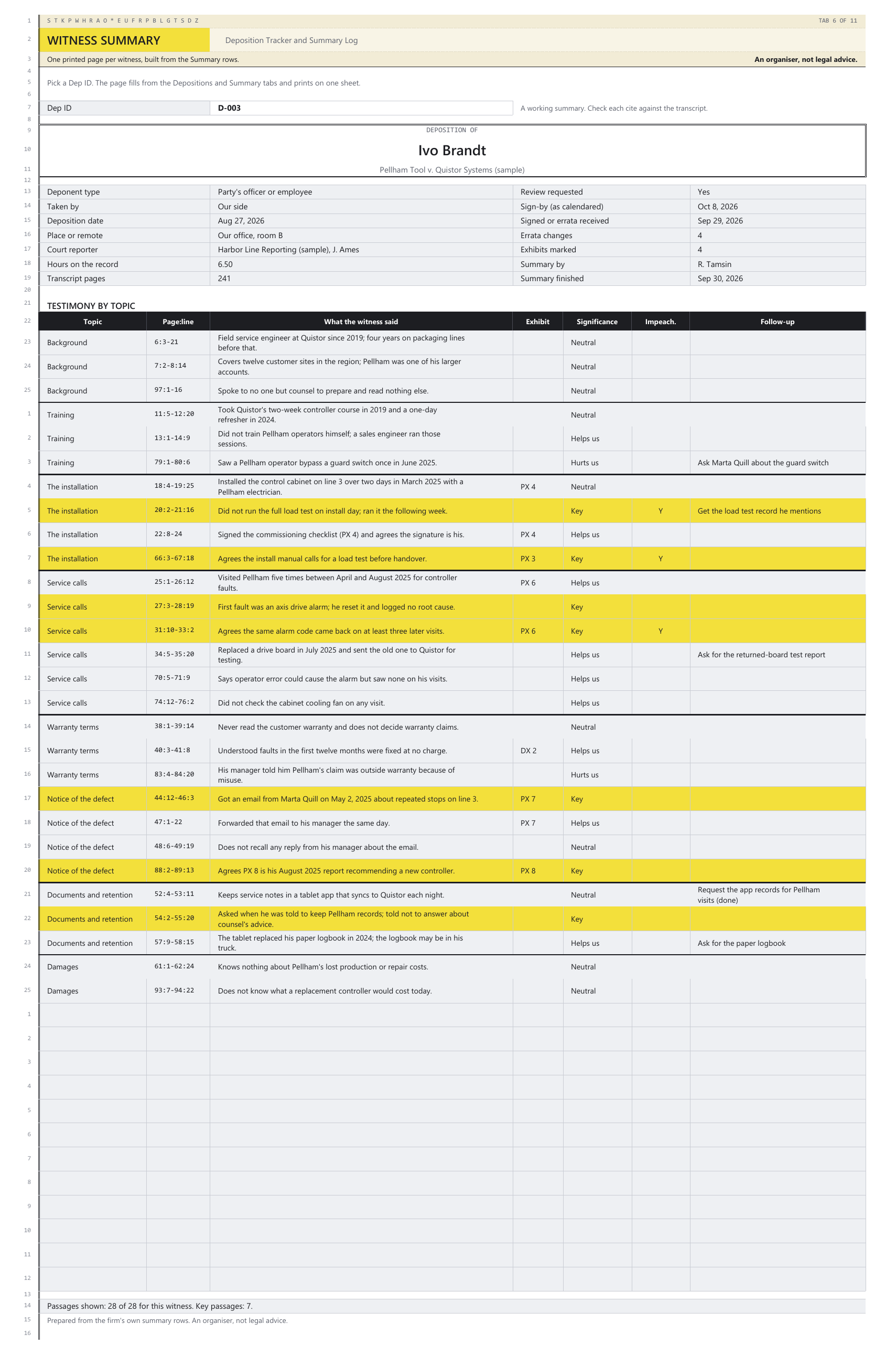
The views are built from those rows, so nothing is typed twice. The Topical View sorts every passage by topic, then witness, page and line. The Witness Summary prints one page for the Dep ID you pick: the deposition's details, then the testimony by topic with each page:line cite.
Your own views go in Notes, apart from what the witness said. The views are plain formulas (SMALL, INDEX and MATCH, no FILTER), so they work the same in Excel 2016 and later, Google Sheets and LibreOffice.
Deposition of Ivo BrandtPellham Tool v. Quistor Systems (sample), 241 pages, 6.50 hours on the record
- 18:4-19:25Installed the control cabinet on line 3 over two days in March 2025 with a Pellham electrician.Neutral
- 20:2-21:16Did not run the full load test on install day; ran it the following week.Key
- 22:8-24Signed the commissioning checklist (PX 4) and agrees the signature is his.Helps us
- 66:3-67:18Agrees the install manual calls for a load test before handover.Key
Testimony by topic: the installation. The sample matter, witness and passages are made up.
What the sheet works out, and what it leaves to you
| What | What the sheet does | The Check line you might see |
|---|---|---|
| Hours on the record | Adds up the stretches you type on Sessions and shows them beside the time limit you type. | Check: hours on the record are above the limit you typed |
| Days | Counts days between two dates you typed, and from today to a date you typed. Nothing else. | Check: transcript out 42 days, past your Lists window |
| Deadlines | None. The review, signing, notice and subpoena windows start from events only your office knows about, so you type the sign-by date as your lawyer calendars it. | Check: sign-by date you typed has passed, nothing received |
| Page and line | Builds each cite (45:12-46:3) from four numbers, and checks each line against your lines per page. | Check: line number above your lines-per-page setting |
| Errata | Keeps each change with the reason the witness gave. | Check: no reason typed for this change |
Every Check line describes what you typed. None of them decides anything.
The Dashboard
What is coming up and what is still open, from the dates and rows you typed. These are the sample firm's counts.
The rules it quotes
The Rules tab quotes 23 passages of federal and New York text word for word, with the web address and the date each was read. Here are the main ones in plain words.
| What | In plain words | Source |
|---|---|---|
| Notice | The party taking a deposition gives every other party reasonable written notice of the time and place. In New York, that is twenty days' notice unless the court orders otherwise. | FRCP 30(b)(1); CPLR 3107 |
| A witness who isn't a party | In New York, a witness who is not a party or a party's officer, director, member or employee is served with a subpoena, at least twenty days before, unless the court orders otherwise. | CPLR 3106(b) |
| Time on the record | Unless the parties agree or the court orders otherwise, 1 day of 7 hours in federal court, counting only the time of the actual deposition; 7 hours per deponent in New York's Supreme and County Courts. | FRCP 30(d)(1) and the 2000 Committee Note; 22 NYCRR 202.20-b(a)(2) |
| How many | In federal court, more than 10 depositions per side needs the court's leave unless the parties agree. New York limits each side to 10 unless the parties agree or the court orders otherwise. | FRCP 30(a)(2)(A)(i); 22 NYCRR 202.20-b(a)(1) |
| Review in federal court | On a request made before the deposition is completed, the witness gets 30 days after the officer's notice that the transcript is available to review it and sign a statement of changes and reasons. | FRCP 30(e)(1) |
| Review in New York | The witness reads the transcript, changes go at the end with the reasons, and no change can be made more than sixty days after it was submitted for review. | CPLR 3116(a) |
| Exhibits | In federal court, documents produced during the deposition are marked and attached to it on a party's request. In New York, exhibits marked during the examination are annexed to the deposition and returned with it. | FRCP 30(f)(2)(A); CPLR 3116(c) |
| Objections | Objections are noted on the record and the examination goes on. They are stated briefly and in a way that doesn't suggest an answer. | FRCP 30(c)(2); 22 NYCRR 221.1(b) |
The sheet never works out a deadline from these. The windows start from events only your office knows about, the parties can agree other terms, and other states' rules differ, so every date is typed as your lawyer calendars it. Rules and their numbering change, so check the current text before relying on it.
What's in the file
Eleven tabs, each ruled like a transcript page with line numbers down the margin. White cells are yours to type in. Grey cells are worked out by the sheet: leave them alone and they stay right.
- 1 Start HereWhat the file is, how each tab works, the colour key, and the notes on work product and the sample data.
- 2 DepositionsOne row per deposition across every matter: notice and subpoena dates, the deposition date, the court reporter, transcript ordered and received, and the sign-by date as your lawyer calendars it.
- 3 SessionsOne row per stretch on the record. Breaks are not rows. The hours add up beside the time limit you type.
- 4 SummaryOne row per passage: page and line, topic, what the witness said, exhibit, objection, your significance tag, impeachment, designation and follow-up.
- 5 Topical ViewEvery passage sorted by topic, then witness, page and line. Pick a topic or a matter to narrow it.
- 6 Witness SummaryPick a Dep ID and one printed page fills in: the deposition's details and the testimony by topic.
- 7 ExhibitsOne row per exhibit as marked, with the Bates range and the page and line where it was marked.
- 8 ErrataOne row per change: what the transcript reads, the change and the reason the witness gave.
- 9 ListsLines per page, your topics in the order the views sort them, and your matters.
- 10 RulesFederal and New York rule text on depositions, word for word, with the web address and the date read.
- 11 DashboardThe next seven days, depositions coming up, transcripts still out, sign-by dates with nothing received, summaries not finished and open follow-ups.
Yours to type inWorked out by the sheetA passage you tagged KeyOnly for a problem: a Check line, with a red tick in the line-number margin
Every formula was checked before it went on sale. A separate program read only the cells you type in and worked out every formula cell again from scratch: hours on the record from the sessions, days between typed dates, every page:line cite, the order of the Topical View, the Witness Summary page, every Dashboard figure and every Check line. Then it compared its answers with the spreadsheet's own, cell by cell, and it fails if any formula cell goes unchecked.
It ran again on the blank copy and on three test files full of awkward entries: repeated and missing IDs, dates and pages typed as text, a session that ends before it starts, lines past the page length, unknown exhibits, errata with no reason, and every summary row filled. Each came back with no mismatches. Then 5 wrong values were planted on purpose, and the check found exactly those 5.
Questions
Does it work in Google Sheets?
Yes. Upload the file to Google Drive, then open it. The views are plain formulas, so they work there too. It also opens in Excel 2016 and later and LibreOffice Calc, with no macros and no add-ons.
Will it work out the review or errata deadline?
No. The review window starts from the officer's notice or from submission to the witness, events only your office knows about, and the parties can agree other terms. You type the sign-by date as your lawyer calendars it, and the Dashboard shows the dates you typed that are coming up or have passed with nothing received.
Which courts is it for?
Any US court, because you type every date and every limit you are working to. The Rules tab quotes the federal rules and New York's CPLR and court rules, because those are what it was built around. Other states' rules differ.
Can I print a summary for one witness?
Yes. Pick a Dep ID on the Witness Summary tab and one page fills in: the deposition's details, then up to 40 passages by topic with their page:line cites. It says how many passages are shown and how many are tagged Key.
How much room is there?
300 depositions, 600 sessions, 2,000 summary passages, 600 exhibits and 600 errata changes, with up to 40 topics and 30 matters. The Topical View shows up to 500 passages at a time.
Is there a subscription?
No. It's a one-time download, for use within one firm per purchase. You keep the file.
What if something doesn't work?
Email contact@northlineoffice.com and include your order email. Typical response within 2 business days.
Please note
- Digital download. Nothing is shipped.
- No macros, no add-ons, no subscription.
- An organiser, not legal advice. It never works out a deadline: you type every date as your lawyer calendars it. The Rules tab quotes the federal and New York text for reference, and every Check line describes what you typed; none of them decides anything.
- Not made by, approved by or connected with any court, any court reporting firm, any bar association or any government office.
- The file will hold work product and may hold testimony marked confidential under a protective order. Keep it where your firm keeps case files, password-protect it, and follow the order before sharing it.
- The sample matters, people, firms and court reporter are made up.
License: personal use, or use within one firm per purchase. No resale or sharing of the file.
Every deposition, page and line
A one-time download, for use within one firm per purchase. Digital file, nothing shipped, no subscription.
Sold through Gumroad. Questions before you buy: contact@northlineoffice.com
Excel 2016 or later, Google Sheets, LibreOffice
More from the Law Office: Case Deadline and Discovery Tracker, Billable Hours and Invoice Log, Client Trust Account Ledger (New York), Executor Estate Inventory and Ledger, Medical Records Request and Chronology Log, Settlement Disbursement Sheet (New York), Law Firm Client Intake and Conflict Check Log, Successor Trustee Accounting Ledger