
Law Office / Settlement disbursement sheet
Settlement Disbursement Sheet (New York)
Where every dollar of a settlement goes, one statement per case.
Every check, cost, lien and fee on one sheet, and a statement for the client that adds back to the gross. A workbook for solo and small firms that pay out contingency settlements, and for the paralegals and bookkeepers who prepare the figures. Record each check as it comes in, the costs, the liens and the fee, then pick a case and print the client's settlement statement on one page, with a stub for every payee.
With a New York switch. Works in Excel, Google Sheets, LibreOffice and Apple Numbers. No macros.
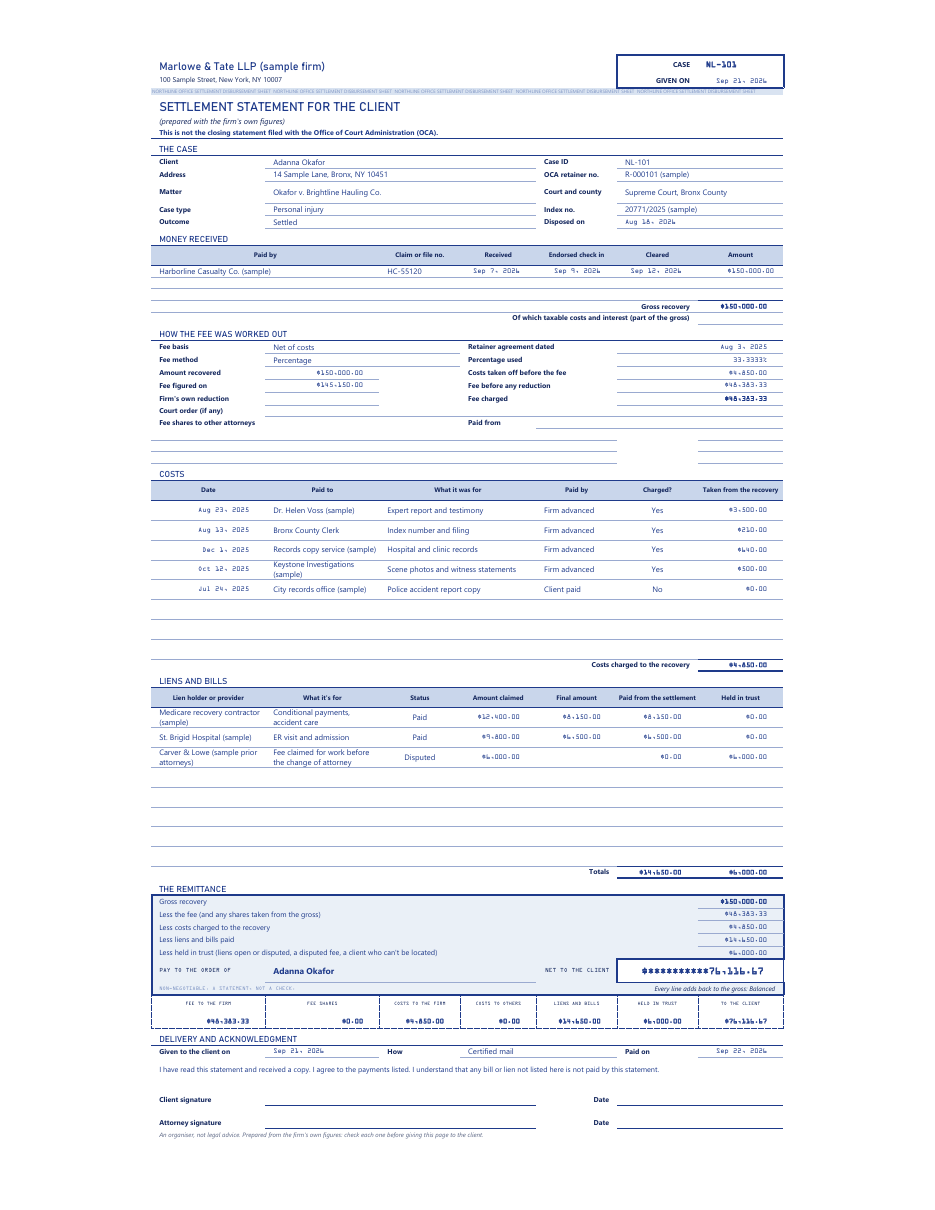
Scroll the sheet sideways to see all of it.
How the money is split
The fee comes off the base your retainer names, at the percentage you type. Pick the fee basis from the retainer, net of costs or gross, and type the percentage, as =1/3 for one third. On a net-of-costs case the costs come off before the fee. On a gross case they don't. The sheet never picks the basis for you.
No lien comes off before the fee. New York's rules say the percentage is worked out with no deduction for liens or claims of hospitals, doctors and nurses, self-insurers or insurance carriers (22 NYCRR 691.20(e)(3)), so the sheet keeps every lien out of the fee base.
With New York rules on, you can also pick Schedule A or the Judiciary Law 474-a bands as the fee method, and the Fee tab shows a New York reference figure beside your fee. The bands and their sources sit on the Rules tab.
How the fee was worked out
| Sample case NL-101 | Amount |
|---|---|
| Amount recovered | $150,000.00 |
| Costs taken off before the fee | $4,850.00 |
| Fee figured on | $145,150.00 |
| Percentage used (you type =1/3) | 33.3333% |
| Fee charged | $48,383.33 |
From the sample Statement. Fee basis: net of costs, from the retainer. The percentage was typed as =1/3.
The remittanceSample case NL-101
- Gross recovery
- $150,000.00
- Less the fee
- $48,383.33
- Less costs charged to the recovery
- $4,850.00
- Less liens and bills paid
- $14,650.00
- Less held in trust (a disputed claim)
- $6,000.00
Pay to the order of The client$****76,116.67
Non-negotiable. A statement, not a check.
| Fee to the firm | $48,383.33 |
| Fee shares | $0.00 |
| Costs to the firm | $4,850.00 |
| Costs to others | $0.00 |
| Liens and bills | $14,650.00 |
| Held in trust | $6,000.00 |
| To the client | $76,116.67 |
One perforated stub per payee, as the Statement prints them. Every line adds back to the gross: $150,000.00, Balanced.
The dates it watches
The sheet counts these from the dates you type, and the Dashboard shows the ones coming up in the next 7 days. Each day count sits on the Rules tab, where you can change it.
| Date | When it shows | Source |
|---|---|---|
| 15-day date | New York rules On, and the case is in a department that files with OCA (the First and Second). Counted from the day the endorsed check came in, or the day received when no endorsement is needed. | 22 NYCRR 603.25(d)(1), 691.20(d)(1) |
| 30-day date | A case with no recovery, in a department that files with OCA. Counted from the disposition. | 22 NYCRR 691.20(b)(1) |
| Medicare repay-by | 60 days after the demand letter's date, unless you type the date on the letter. | 42 CFR 411.24(h) |
| Keep records until | Seven years after the last payment out, or the disposition. | 22 NYCRR 691.20(f) |
The Office of Court Administration's FAQ says the First and Second Departments require these statements to be filed and the Third and Fourth don't. Switch New York rules Off on the Rules tab for a firm outside New York, and none of these New York dates show.
What's in the file
Ten tabs, one stub each. White cells are yours to type in. Blue-grey cells are formulas: leave them alone and they stay right.
- 01 Start HereHow the tabs fit, what the sheet works out and what you decide, the New York switch and the notes.
- 02 CasesOne line per case: the client, the matter, the department, the outcome and the dates the statement went out and the client was paid.
- 03 Payments InEvery check or wire from a carrier or defendant: received, endorsed by the client, deposited and cleared. The gross recovery is the sum of these.
- 04 CostsEvery case expense, who paid it and whether it's charged to the recovery. Costs the firm advanced are paid back to the firm.
- 05 Liens and BillsEvery lien or bill against the money: the amount claimed, the final amount you type from the holder's letter, and whether it's paid, held or released.
- 06 FeeThe fee basis and method from the retainer, the percentage you type, fee shares and the dates and check numbers of the fee and cost checks.
- 07 StatementPick a case ID and the client's settlement statement fills in on one page, ready to print, with a rider for extra lines.
- 08 Trust Register LinesThe case's deposits and payments in the Client Trust Account Ledger (NY)'s own column order, to paste in as values.
- 09 RulesThe day counts, fee schedules and switches, each with its source word for word, the web address and the date it was read. The New York switch is here.
- 10 DashboardMoney not cleared, cases ready to pay out, what's held in trust, 15-day and repay-by dates coming up, and every case at a glance.
Yours to type inFormula cellsOnly for a problem: a Check line or a net below zero
Every formula was checked before it went on sale. A separate program read only the cells you type in and worked out every formula cell again from scratch: each case's gross, fee, costs, liens, what's held and the client's share, the proof that every line adds back to the gross, the 15-day and 30-day dates, every line of the printed Statement, the Trust Register Lines and every Dashboard figure. Then it compared its answers with the spreadsheet's own, cell by cell.
It ran again on two test files full of awkward cases, one with New York rules on and one with them off: one third typed as 0.33, 0.3333 and =1/3, Schedule A a cent over each band, costs above the recovery, liens above the client's share, money paid out before it cleared, a disputed fee held back, and more lines than the Statement page holds. Each came back with 16,678 checks and no mismatches, and none of the three files had a single error cell. Then 5 wrong values were planted on purpose, and the check found exactly those 5.
The Trust Register Lines were pasted into a copy of the Client Trust Account Ledger (NY): 6 lines, no error cells, and the client's trust balance came out equal to what the sheet holds.
Questions
Does it work in Google Sheets?
Yes. Upload the file to Google Drive, then open it. Everything works there too. It also opens in Excel, LibreOffice Calc and Apple Numbers, with no macros and no add-ons. Amounts print in a bank-numeral face where your computer has it (Excel on Windows does); Google Sheets and a Mac show a plain face instead.
Is this the closing statement I file with OCA?
No. The printed page is a settlement statement for the client, made from the firm's own figures. It isn't the closing statement filed with the Office of Court Administration, and the file has no copy of any court form. With New York rules on, it shows the 15-day date from the endorsed check, so you can see when the closing statement comes due.
Will it tell me whether a lien is valid, or whether Medicare has a claim?
No. You type the final amount from each holder's letter and decide whether to pay it, hold it or release it. Medicare lines show a 42 CFR 411.37 figure as a reference beside the demand you type, and a repay-by date, and the sheet says Check when a line needs a second look.
Is it only for New York?
New York is filled in on the Rules tab: the 15-day and 30-day dates, the departments that file with OCA, and the Schedule A and 474-a bands. Switch New York rules Off and those go away. Payments, costs, liens, the fee from your percentage, the Statement and the Dashboard work the same anywhere.
Do I need the Client Trust Account Ledger too?
No. This sheet works on its own. If you do keep the Client Trust Account Ledger (NY), the Trust Register Lines tab lays out each case's deposits and payments in its column order, so you can copy them and paste them in as values.
How much room is there?
100 cases, 150 payments, 300 costs and 200 liens and bills. The printed Statement holds 3 payments, 8 costs and 8 liens on its page; more lines go on the rider printed under it.
Is there a subscription?
No. It's a one-time download, for use within one firm per purchase. You keep the file.
What if something doesn't work?
Email contact@northlineoffice.com and include your order email. Typical response within 2 business days.
Please note
- Digital download. Nothing is shipped.
- No macros, no add-ons, no subscription.
- An organiser, not legal advice. It doesn't decide whether a lien is valid, whether Medicare or Medicaid has a claim, or whether a fee is reasonable, and it has no set-aside, tax or structured settlement figures and no copy of any court form.
- The printed page is titled "Settlement statement for the client (prepared with the firm's own figures)". It is not the closing statement filed with the Office of Court Administration. Review its acknowledgment wording for your practice before you use it.
- Not made by, approved by or connected with the Office of Court Administration (OCA), the New York courts, CMS, the New York State Department of Health or any lien holder.
- The file will hold client financial and health information once you fill it in. Keep it where your firm keeps client files.
- The sample cases, people, firms, carriers and lien holders are made up.
License: personal use, or use within one firm per purchase. No resale or sharing of the file.
Every dollar, one statement
A one-time download, for use within one firm per purchase. Digital file, nothing shipped, no subscription.
Sold through Gumroad. Questions before you buy: contact@northlineoffice.com
Excel, Google Sheets, LibreOffice, Numbers
More from the Law Office: Case Deadline and Discovery Tracker, Billable Hours and Invoice Log, Client Trust Account Ledger (New York), Executor Estate Inventory and Ledger, Medical Records Request and Chronology Log