
Law Office / Successor trustee ledger
Successor Trustee Accounting Ledger
One trust, from the day you take over, with principal and income kept apart.
Every receipt and payment carries its principal part, its income part and the reason for the split. A workbook for a successor trustee of a family trust, and for the lawyers, accountants and bookkeepers who prepare the figures. Record the trust's property on numbered box plates, every receipt and payment, what each beneficiary received and what you took as commissions, then print a Trustee's Annual Statement for one beneficiary for the trust year.
With a governing-law switch. Works in Excel, Google Sheets, LibreOffice and Apple Numbers. No macros.
Scroll the sheet sideways to see all of it.
Principal and income, kept apart
You type the split, and the reason for it. Every line of the Register takes a principal part and an income part. The ledger adds them up, runs principal cash and income cash as two balances, and says Check when the parts do not add back to the amount. It never decides the split for you, because the trust instrument, your state's act and your own discretion decide it, and the Decisions tab is where you write down why.
Nothing is worked out that a trustee is supposed to decide. No commission, no unitrust amount, no adjustment between principal and income, no notice date and no tax figure. You type those. The ledger keeps them straight and flags anything that does not add up.
Principal columns sit under violet heads and income columns under saffron heads, all the way through: the Register, the Distributions, the commissions, the Statement and the Account Summary.
The trust year, as the Account Summary sets it out
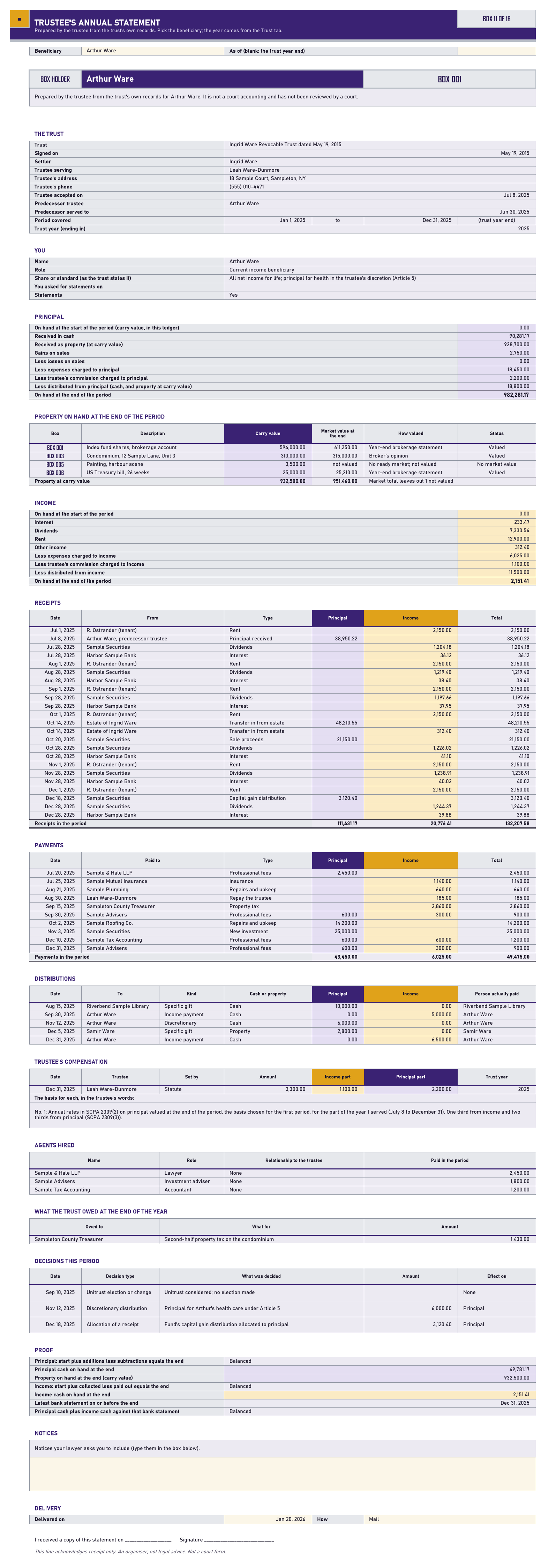
| Sample Ingrid Ware trust, 2025 | Principal | Income |
|---|---|---|
| On hand at the start of the year | $0.00 | $0.00 |
| Received, and income collected | $1,018,981.17 | $20,776.41 |
| Gains on sales | $2,750.00 | $0.00 |
| Less expenses, with the commission | $20,650.00 | $7,125.00 |
| Less distributed to beneficiaries | $18,800.00 | $11,500.00 |
| On hand at the end of the year | $982,281.17 | $2,151.41 |
From the sample Trustee's Annual Statement and the Account Summary. Every figure comes from lines the trustee entered.
Account summaryIngrid Ware trust, 2025
Charges
- Principal on hand at the start
- $0.00
- Principal received (cash, and property at carry value)
- $1,018,981.17
- Realized increases (gains on sales)
- $2,750.00
- Income on hand at the start
- $0.00
- Income collected
- $20,776.41
- Total charges
- $1,042,507.58
Credits
- Realized decreases (losses on sales)
- $0.00
- Expenses charged to principal, with the commission's principal part
- $20,650.00
- Distributions of principal
- $18,800.00
- Principal on hand at the end
- $982,281.17
- Expenses charged to income, with the commission's income part
- $7,125.00
- Distributions of income
- $11,500.00
- Income on hand at the end
- $2,151.41
- Total credits
- $1,042,507.58
Total charges less total creditsBalanced
Four of the figures the ledger works out for you. Total charges and total credits both come to $1,042,507.58, so the year is Balanced.
What the rules ask of a trustee
The Rules tab holds 22 of them, quoted or paraphrased, each with its law, its source, the web address and the date it was read. The governing-law switch on the Trust tab decides which ones the sheet marks as yours. Here are five.
| Rule | What it asks | Source |
|---|---|---|
| A statement every year | New York: a trustee may retain commissions provided he or she furnishes annually, to each beneficiary currently receiving income, a statement showing the principal assets on hand, the receipts of income and principal, the commissions retained and the basis on which they were computed. | N.Y. Surr. Ct. Proc. Act 2309(4) |
| Notify within 60 days | California: on a change of trustee of an irrevocable trust, the duty to serve the notification is the duty of the continuing or successor trustee, and it is served not later than 60 days after the event that requires it. | Cal. Prob. Code 16061.7 |
| Report at least once a year | Paraphrased: keep the qualified beneficiaries reasonably informed, and send current distributees a report of the trust property, liabilities, receipts and disbursements, with the source and amount of the trustee's pay. | Uniform Trust Code 813 |
| Charges equal credits | California: total charges shall equal total credits. The Account Summary sets the year's charges against its credits and shows the difference. | Cal. Prob. Code 1061(c) |
| Keep trust property separate | New York: every fiduciary shall keep property received as fiduciary separate from his individual property. | N.Y. Est. Powers & Trusts Law 11-1.6 |
Rules change. Check the current text before you rely on any of it, and ask your own lawyer which act your state has enacted. The ledger quotes the rules; it does not apply them for you.
What's in the file
Sixteen tabs, one box plate each. Ivory cells are yours to type in. Steel cells are formulas: leave them alone and they stay right.
- 01 Start HereHow the tabs fit, what the ledger works out and what you decide, and what it never works out for you.
- 02 TrustThe trust's facts, the governing-law switch (New York, California, a Uniform Trust Code state, or other), the trust year, the trustees in order and the tax forms by name.
- 03 PeopleEach beneficiary, what the trust gives them, the notices you sent, the copies of the trust you handed over, statement requests, written waivers and deliveries.
- 04 AssetsEvery property on its own numbered box plate, at carry value, how it is titled, and whether it was sold, given out or is still on hand.
- 05 Year-End ValuesMarket values at the start and end of each trust year, how each one was valued, and what the trust owed at a year end.
- 06 RegisterEvery receipt and payment, split into the principal part and the income part you type, with the reason. Principal cash and income cash run as two balances.
- 07 DistributionsMoney or property given to each beneficiary, from principal or from income, the box it came out of, and the signed receipt.
- 08 Trustee PayCommissions as you took them, their income and principal parts and the basis in your own words, and the agents you hired and what they were paid.
- 09 DecisionsEvery allocation, adjustment, unitrust choice, discretionary distribution and waiver, with who decided it and where it is written down.
- 10 Bank CheckYour bank statement balance on a date beside the ledger's principal cash plus income cash on that date, and the difference between them.
- 11 StatementPick a beneficiary and the Trustee's Annual Statement fills in for the trust year, ready to print. It is the trustee's own statement, not a court accounting.
- 12 Account SummaryThe year's charges and the year's credits, in the order the New York trust account uses, with total charges set against total credits.
- 13 From ExecutorPaste the Distributions tab of the Executor Estate Inventory and Ledger, and the lines for this trust are picked out and checked against this ledger.
- 14 NY CrosswalkEach schedule of the New York Surrogate's Court trust account form and where its figures are here, to help prepare it. No court form is copied.
- 15 Rules22 rules quoted or paraphrased, each with its source, the web address and the date it was read. Rules change, so check the current text.
- 16 DashboardA wall of box doors: principal and income on hand, the latest bank check, statements due and delivered, lines with a Check, assets not titled in the trust's name and tax forms still to do.
Yours to type inFormula cellsPrincipalIncome
Every formula was checked before it went on sale. A separate program read only the cells you type in and worked out every formula cell again from scratch: the trust year of every date, the trustees serving, the Register's direction and its principal and income parts, both running balances, every Check message, the Assets tab's sale proceeds and gain or loss, the Year-End Values lookups, the distributions, the commissions and their New York and Uniform Trust Code checks, the agents, the bank checks, the whole Trustee's Annual Statement, the Account Summary's charges and credits, the From Executor matching, the NY Crosswalk figures and every Dashboard door. Then it compared its answers with the spreadsheet's own, cell by cell, after LibreOffice had recalculated the file.
It ran again on six test files full of awkward cases: a receipt dated on the trust year end and one on the first day of the next year, a split that does not add back, a split off by a cent, no reason typed for a split, a payment made personally and not yet repaid, a sale below and at carry value, a sale of a box that is not on the Assets tab, a payment that overdraws income, a line with only a date, a date typed as text, and the governing law switched between New York, California, a Uniform Trust Code state and other. Each of the seven files came back with 33,115 checks and no mismatches, no error cells, and no formula cell left unchecked. Then 5 wrong values were planted on purpose, and the check found exactly those 5.
Every page of the workbook was audited for text touching a border or anything cropped at an edge: 0 problems, and 0 green or teal pixels anywhere.
Questions
Does it work in Google Sheets?
Yes. Upload the file to Google Drive, then open it. Everything works there too. It also opens in Excel, LibreOffice Calc and Apple Numbers, with no macros and no add-ons.
Is this a court accounting?
No. The Statement tab prints the trustee's own annual statement to one beneficiary for the trust year, from the trust's own records. It is not a court account and it has not been reviewed by a court. The Account Summary and the NY Crosswalk lay the same figures out the way a New York trust account arranges them, so your lawyer has somewhere to start.
Will it work out my commission?
No. You record each commission as you took it, with its income and principal parts and the basis in your own words. The Rules tab quotes the New York annual rates and the one-third income, two-thirds principal split for reference, and the ledger checks that what you typed adds up. It never computes a commission, a unitrust amount, an adjustment or a tax figure.
Which states does it cover?
The Trust tab has a governing-law switch: New York, California, a Uniform Trust Code state, or other. The switch decides which rules the Rules tab marks as yours and which checks run. The ledger itself, the two balances, the Statement and the Account Summary work the same anywhere.
Do I need the Executor Estate Inventory and Ledger too?
No. This workbook works on its own. If the trust was funded out of an estate you kept in the Executor Estate Inventory and Ledger, the From Executor tab takes that workbook's Distributions tab pasted in, picks out the lines for this trust and checks them against this ledger.
How much room is there?
40 people, 200 assets, 400 year-end values, 60 liabilities, 1,500 register lines, 300 distributions, 60 commission lines, 30 agents, 200 decisions, 120 bank checks and 200 pasted lines from the executor.
Is there a subscription?
No. It's a one-time download, for use for one trust per purchase. You keep the file.
What if something doesn't work?
Email contact@northlineoffice.com and include your order email. Typical response within 2 business days.
Please note
- Digital download. Nothing is shipped.
- No macros, no add-ons, no subscription.
- An organiser, not legal advice. It is not tax or accounting advice either. It works out no commission, no unitrust amount, no adjustment between principal and income, no notice date and no tax figure. You decide those and type them in.
- The Statement is the trustee's own statement to a beneficiary. It is not a court accounting, it has not been reviewed by a court, and the file has no copy of any court form.
- Not made by, approved by or connected with any court, bar association, the Uniform Law Commission, the IRS or any government office.
- The file will hold beneficiaries' names and addresses once you fill it in. Keep it where you keep the trust's papers. It asks for the last 4 digits of an account or EIN, never the whole number.
- The Ingrid Ware trust and every person, firm, bank and address in it are made up.
License: personal use, or use for one trust per purchase. No resale or sharing of the file.
One trust, kept straight
A one-time download, for use for one trust per purchase. Digital file, nothing shipped, no subscription.
Sold through Gumroad. Questions before you buy: contact@northlineoffice.com
Excel, Google Sheets, LibreOffice, Numbers
More from the Law Office: Case Deadline and Discovery Tracker, Billable Hours and Invoice Log, Client Trust Account Ledger (New York), Executor Estate Inventory and Ledger, Medical Records Request and Chronology Log, Settlement Disbursement Sheet (New York), Law Firm Client Intake and Conflict Check Log