
Law Office / Case deadline tracker
Case Deadline and Discovery Tracker
Every deadline, every matter, one screen. Filings, hearings, discovery responses and subpoenas live in one workbook. It counts the days and flags what is late or close, so nothing slips between the calendar and the file.
Works in Excel, Google Sheets, LibreOffice and Apple Numbers. No macros.
Case-Deadline-Tracker.xlsx
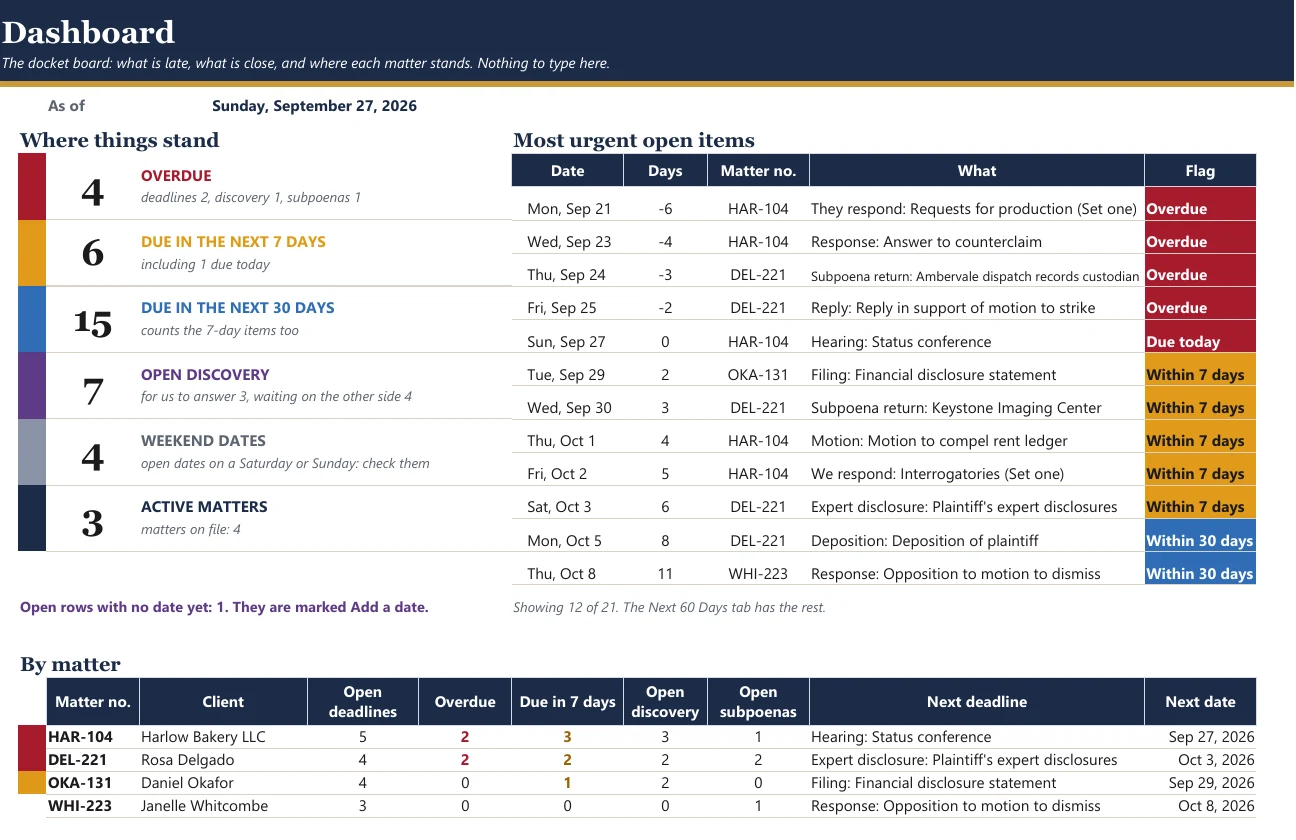
The flags raise themselves
You type the date. The tracker works out how far away it is and colours the row. Nobody has to do the arithmetic, and a red row can't hide at the bottom of a long page.
- OverdueThe date has passed and the item is still open.
- Due todayIt is due today.
- Within 7 daysDue in the next week.
- Within 30 daysDue in the next month.
- WeekendThe date you entered is a Saturday or Sunday. Check the court's rule for computing time.
- Done, Vacated, AnsweredClosed items stay on the list, greyed out, so the history is still there.
What's in the workbook
Seven tabs, built around the way a docket is kept. The yellow cells are the only ones you type in.
- Matters
One line per matter
Matter number, client, court and case number. Room for 40 matters.
- Deadlines
Every date and where it came from
Filings, motions, responses, hearings, depositions, expert disclosures, mediation, pretrial, trial and statute of limitations. A source column for the order, rule or notice behind each date. Room for 300.
- Discovery
Who owes what
Requests served and received, the date the response is due, whether it's answered, objections and meet-and-confer notes.
- Subpoenas
Their own short log
Recipient, served date, return date and status, so a records subpoena doesn't sit forgotten between two motions.
- Next 60 Days
The Monday look-ahead
Everything coming up across all matters, sorted by date and grouped week by week.
- Dashboard
The counts at the top
How many overdue, how many this week, how many this month, the most urgent open items, and where each matter stands.
Every formula was checked before it went on sale. A separate program read only the yellow input cells and worked out every flag, day count, weekend warning, the 60-day list and the dashboard again from scratch. Then it compared its answers with the spreadsheet's own, cell by cell.
That ran on the sample workbook and on a second test file packed with awkward cases, such as blank dates, empty tabs and dates that land on weekends. Both came back with no mismatches and no error cells.
Your data stays on your computer, or in your own Google Drive if you use Sheets. Nothing is sent to us.
Questions
Does it work in Google Sheets?
Yes. Upload the file to Google Drive and open it with Google Sheets. It also opens in Excel, LibreOffice Calc and Apple Numbers. There are no macros and no add-ons.
Can more than one person use it?
Yes, within one firm. Keep it on a shared drive or share it in Google Sheets so everyone works from the same list. The license covers one firm per purchase.
Does it calculate deadlines from the rules?
No, on purpose. Rules differ by court and by judge, so you enter the date you worked out and note its source. The tracker counts the days, flags them and warns you when a date lands on a weekend.
Is there a subscription?
No. It's a one-time $4.99 download. You keep the file.
What if something doesn't work?
Email contact@northlineoffice.com with your order email and we'll sort it out, usually within 2 business days.
An organiser, not legal advice
The tracker keeps your dates in order. It doesn't work out deadlines from court rules.
- You enter every date yourself, from the order, the rule or the notice.
- Check each one against your court's rules, local rules and the judge's orders.
- The sample matters and names in the file are made up.
Keep every date in one place
A one-time download for your firm. Digital file, nothing shipped, no subscription.
Sold through Gumroad. Questions before you buy: contact@northlineoffice.com
Excel, Google Sheets, LibreOffice, Numbers
More from the Law Office: Client Trust Account Ledger (New York), Executor Estate Inventory and Ledger, Medical Records Request and Chronology Log