
Mercy Harbor Hospital
Okafor v. Brightline. HIPAA authorization, litigation.
- Pages
- 128
- Reference, pages x $0.75
- $96.00
- Fee quoted
- $96.00
No Check shown. The quote matches the reference.
Law Office / Medical records log
Every records request, its fee and its date to watch, on one log. A workbook for personal injury firms and the paralegals who chase medical records. Log each request as it goes out, see which ones need a follow-up, check the fee a provider quotes, and build the treatment chronology from the records as they come in. The medical bills total keeps itself up to date.
With a New York fee check. Works in Excel, Google Sheets, LibreOffice and Apple Numbers. No macros.
Scroll the sheet sideways to see all of it.
The 30 days belong to the patient's own request. Under 45 CFR 164.524, a provider must act on a patient's request for access no later than 30 days after it receives the request. The clock starts when the provider gets it, so the log keeps the date the provider received it beside the date you sent it.
A request the firm makes on a signed HIPAA authorization, or with a subpoena, gets no due date from the sheet. You type your own follow-up date and the log tells you when it comes. That's a choice made for this sheet, and the Rules tab says so.
The same rule lets a provider extend once, by no more than 30 days, with written notice. Mark the extension received and the due date moves. HHS has a final rule pending that may shorten the 30 days, so the day counts sit on the Rules tab, where you can change them.
| Request type | Date to watch |
|---|---|
| Patient's own request | Due 30 days after the provider receives it |
| Patient's directive to the firm | Due 30 days after the provider receives it |
| HIPAA authorization | Your own follow-up date |
| Subpoena or court order | Your own follow-up date |
| Other | Your own follow-up date |
From the Rules tab: 45 CFR 164.524(b)(2), read on September 27, 2026. Canary lines are the ones you follow up yourself.
New York Public Health Law 18 says the reasonable charge for paper copies shall not exceed seventy-five cents a page. It also says no charge may be imposed for records requested to support an application, claim or appeal for a government benefit or program, such as SSDI. For a New York matter the log shows pages x 0.75 as a reference fee, and says Check when the quote is higher or when a fee is quoted on a benefit claim.
Okafor v. Brightline. HIPAA authorization, litigation.
No Check shown. The quote matches the reference.
Okafor v. Brightline. HIPAA authorization, litigation.
Check: fee above the state reference
Pruitt SSDI claim. HIPAA authorization, government benefit claim.
Check: fee on a government benefit claim
Three lines from the sample Requests Log, which is made up. The 75 cents is a reference, not a ruling on your request. Whether it binds a firm asking on a plain HIPAA authorization wasn't confirmed, so every line has a Fee check you can switch Off.
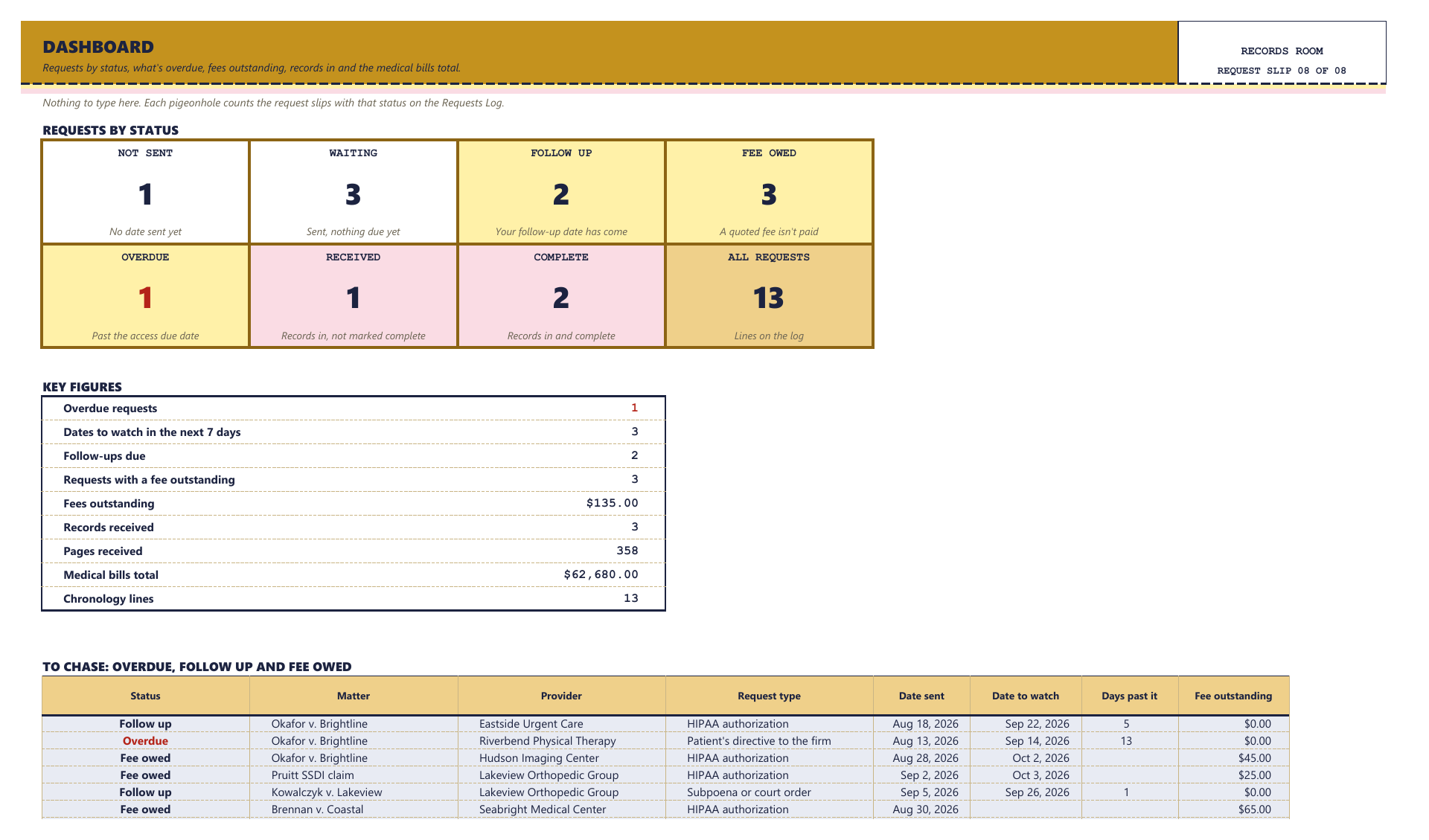
Eight tabs, one pigeonhole each. White, canary and pink cells are yours to type in. Blue-grey cells are formulas: leave them alone and they stay right.
A request that's outNeeds a follow-upRecords are inFormula cells
Every formula was checked before it went on sale. A separate program read only the cells you type in and worked out every formula cell again from scratch: each request's status, the due dates and dates to watch, days out, the reference fees and fee checks, what's still owed, and every count and total on the Dashboard. Then it compared its answers with the spreadsheet's own, cell by cell.
It ran again on a second test file full of awkward cases, such as a due date that falls today and one that fell yesterday, a written extension, a New York fee equal to the reference and one a cent above it, a second state added on the Rules tab, a benefit claim with the fee check switched Off, and text typed where a date belongs. That file came back with 8,106 checks and no mismatches. Neither file had a single error cell. Then 5 wrong values were planted on purpose, and the check found exactly those 5.
The file will hold health information once you fill it in. Keep it where your firm keeps client files.
Yes. Upload the file to Google Drive, then open it. Everything works there too. It also opens in Excel, LibreOffice Calc and Apple Numbers. No macros and no add-ons.
No. Only a patient's own request, or a patient's directive to send to the firm, gets a due date, from the day counts on the Rules tab. On authorization, subpoena and other requests you type your own follow-up date, and the line turns canary when it comes.
New York is filled in on the Rules tab: 75 cents a paper page, and no charge on a government benefit claim. The due dates on patient requests come from the federal rule. You can add your own state's per-page figure and its source on the Rules tab.
It won't. It shows a reference fee and a Check, and the Rules tab gives each source word for word, with its web address and the date it was read, so you can read the rule yourself.
No. It has no forms or letters, and it doesn't read or stamp the records. You type the Bates or page range as the records come in, and the Chronology points back to it.
40 matters, 80 providers, 300 requests, 500 chronology lines and 300 bills.
No. It's a one-time download, for use within one firm per purchase. You keep the file.
Email contact@northlineoffice.com and include your order email. Typical response within 2 business days.
License: personal use, or use within one firm per purchase. No resale or sharing of the file.
A one-time download, for use within one firm per purchase. Digital file, nothing shipped, no subscription.
Sold through Gumroad. Questions before you buy: contact@northlineoffice.com
Excel, Google Sheets, LibreOffice, Numbers
More from the Law Office: Case Deadline and Discovery Tracker, Billable Hours and Invoice Log, Client Trust Account Ledger (New York), Executor Estate Inventory and Ledger